
Software Review: Photoshop CC 2014
September 29, 2014
Adobe Photoshop CC 2014 arrived in mid-June with the usual—or perhaps a little less than usual—fanfare. At least its arrival showed that Adobe’s latest plan is to release minor updates to Photoshop CC during the calendar year, and a full release each year designated by the year of the release. It also conveyed to users why Adobe is sticking to the subscription model—there is little in Photoshop CC 2014 to warrant a user paying for it as an upgrade.
Along with the Photoshop CC 2014 release, which includes Camera Raw 8.5, Adobe announced the release of Lightroom 5.5, the Adobe Photoshop Mix iOS app, and a new Creative Cloud plan for photographers. The photo programs are part of the Adobe release of 14 new 2014 Creative Cloud desktop programs, along with a host of new mobile apps and Creative Cloud services.
The Photoshop CC 2014 release also includes enhancements not specifically aimed at photographers, such as improved layer comps and smart guides, along with Adobe Typekit integration. While I have overcome my initial skepticism about the Creative Cloud subscription paradigm, it is difficult to get excited about this release. There is really only one addition to excite professional photographers: the ability to make a selection based on an area that is in focus.

A composite of three still images shot in the studio. The motion effect in the background and at the rear of the model car is the result of using path blur. The spinning wheels were added with spin blur. Photos © Stan Sholik
You can access the Focus Area dialogue box from the Select drop-down menu. Photoshop makes a default selection that you broaden or narrow by moving the In-Focus Range parameter slider. There are also brushes to add or subtract from the selection, as well as the ability to open the Refine Edges dialogue for further refinements of the outline. When done, you save the selected area to a selection, a layer mask, a new layer, a new layer with a layer mask, a new document, or a new document with a layer mask.
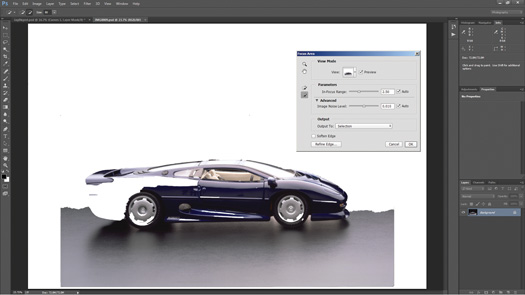
The first pass when you open Focus Area automatically selects the majority of out-of-focus background, but other areas as well. Painting areas in and out is possible with the brushes in the panel.
Any new tool that makes creating a selection easier is welcome. Focus Area works well with subjects captured against an out-of-focus background. The greater the sharpness of the subject and the greater the degree of softness of the background, the easier it is to refine the result.
On the other hand, there is one aspect of Adobe’s Creative Cloud update approach to Photoshop that I find very annoying. In the original Photoshop CC, it bugged me that I could no longer point to the CS6 Plug-ins folder to access my many plug-ins. But it turned out to be no big deal to copy the CS6 folder contents and paste it into the corresponding Photoshop CC folder. I don’t recall any problems after doing this. With the new release, Adobe warns that users should NOT attempt this; the company recommends that each plug-in be reinstalled. Well, I took my chances and found that some copied over fine and others did not. But I certainly don’t look forward to doing this every year, and reinstalling plug-ins that don’t work properly in the new update.
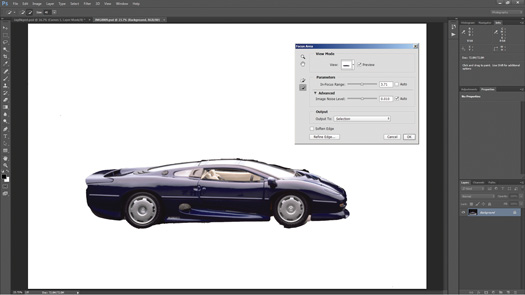
Focus Area only takes you so far with a complex shape; you must use Refine Edges and other tools to complete the selection.
Not only are the actual plug-ins a problem, Adobe has changed the way that extensions must be coded in order to work in this version of Photoshop. The onOne Perfect Photo Suite extension or Kubota Image Tools Dashboard no longer function. You may find others on your computer. Also gone is Mini-Bridge (which I miss) along with Oil Paint and Kuler (which I don’t). Adobe is well aware of the plug-ins and extensions issues, which is why Photoshop CC 2014 does not overwrite Photoshop CC when it installs. Adobe recommends that users keep previous versions of Photoshop on their computers if they need capabilities that an update removes.
A couple of other new tools in Photoshop are of less interest to most photographers, but are worth a mention nonetheless. The new Path Blur and Spin Blur join the previous Field Blur, Iris Blur and Tilt-Shift to form a new Blur Gallery in the Filter drop-down menu.
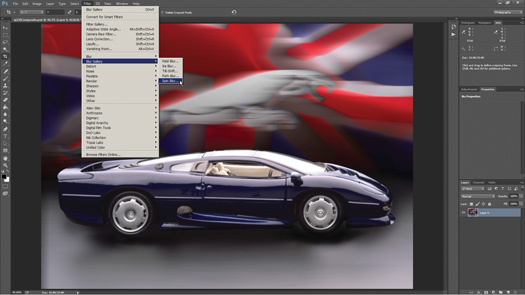
The Path Blur and Spin Blur filters are selected from the new Blur Gallery. The background has already been blurred using Path Blur.
With the Path Blur controls, you can create multiple paths of any shape in an image or a selection, and blur the subject. With careful masking, it is possible to create a relatively believable blur to a static subject. In the few images I played with, there always seemed to be some part of the image that did not blur as much as the rest, but that didn’t destroy the effect.
By using Spin Blur, you can spin and blur objects around one or more points. You control the shape and size of the area to blur, the angle through which to blur, and the speed of the blur. You can even add strobe flashes and control the strobe flash duration to add the illusion of stopped action. I just wish I could copy and paste, so that it would be easier to add the blur to another wheel or image.
Both of the new blurs are interesting, and I suspect designers will love them, but once the novelty wears off I can only imagine a few photographers having a long-term love affair with them.
The version 8.5 update to Adobe Camera Raw added new cameras to the database and upgrades to the Radial and Graduated Filters. You can now see the mask by pressing the ‘Y’ key, and then add or delete from the mask using a brush. Also new is the ability to reset individual panels in Camera Raw to the Adobe default.
The new version of Lightroom announced at the same time as Photoshop, Lightroom 5.5, added no new features to Lightroom other than the ability to sync Lightroom Mobile with the iPhone. Lightroom Mobile is upgraded at the same time to add star as well as flag ratings, and the ability to view and sort images with a custom sort order. Lightroom remains a standalone program as well as part of the Creative Cloud applications.
The most interesting announcement may be the availability of Adobe Photoshop Mix, a free app that extends some of the selection, masking and compositing capabilities of Photoshop to the iPad. In conjunction with Photoshop, Mix can round-trip images from your desktop or laptop computer through the Creative Cloud to the iPad and back again in layers to Photoshop on the desktop with non-destructive changes made in Mix.
The image enhancements found in Photoshop Mix are in line with those in the Adobe Revel, Photoshop Express and Photoshop Touch apps, all of which will continue to exist. With Mix you can access images on your camera roll, those uploaded through Lightroom Mobile and those uploaded to the Creative Cloud. Along with image enhancements, another tool lets you apply 21 preset looks.
What makes Photoshop Mix interesting are the other tools. Using the cut-out tool, you can combine two images by dragging your finger to select areas to eliminate or to add back in if you overdo it. You can feather the selection edges, invert the selection and even automatically refine edges as you work. The crop tool is non-destructive, as is the compositing tool when brought back to Photoshop.
There is even the advanced Photoshop functionality of upright, shake reduction and content-aware fill. Using them requires Wi-Fi connection as the actual changes are made in the Creative Cloud—true cloud computing. A pop-up message in Mix advises that these functions are available for free for a limited time, so we can look forward to increased functionality at a price in the future.
For $9.99 per month with a yearly commitment ($119.88/year), photographers have access to Photoshop CC, Lightroom, Photoshop Mix and Creative Cloud Learn, along with 2GB of Creative Cloud image storage. While there are options to the Adobe programs, most pro photographers have joined the nearly 1.5 million subscribers to the Creative Cloud in order to keep using the tools in Photoshop.
Related Links:
Taking Stock of Your Editing Toolbox
Software Roundup: 4 Programs that Simulate the Look of Film
7 Must-Tap Apps for Photographers
Related Articles

Infinite Color: Color Grading Photoshop Tool with Infinite Options
June 13, 2024
Working as a retoucher, one of the hardest parts of my job wasn’t even the clean up work that an image typically requires, it was the color grading. Applying a specific look to an image to really enhance or create a mood that meets the client’s vision was either doable or really hard. There was never a time when it...
More »
Adobe Max Roundup: Exciting New Features
October 19, 2023
Adobe Max, the company’s annual creativity conference, has just ended, leaving the latest innovations and features across Creative Cloud. You can revisit many of the keynotes and presentations on the Adobe site, but we’ve put together a quick overview of some of the most exciting photo and video news. Lightroom Most of the new features are available for all Lightroom...
More »
Nikkor Z Releases New Lenses & Tether Tools Updates Software
June 30, 2023
Nikon Z 70-180mm f/2.8 Good news for Nikon Z shooters! Nikon has added two new lenses to its Z-series line: the Nikkor Z 70-180mm f/2.8 and the Z 180-800mm f/5.6-6.3 VR. While the latter is best left to wildlife and sports photographers, we think that the Z 70-180mm f/2.8 model looks like a solid lightweight alternative to its more established...
More »
